I bought a game on GOG that only ships with a Windows installer. The game files are obviously in there somewhere, but I need them on a Mac, for DOSBox or another emulator.
You can get them out manually in a few steps.
NorthPane also has a one-key shortcut that does the whole thing for you, but we will get to that at the end.
For this example I am using setup_x-com_ufo_defense_1.14_gog_cfgfix_(77865).exe, a 19 MB installer opened in NorthPane 1.2. Other GOG installers will have different offsets, but the basic structure is the same.
1. Open the installer in Binary Lab
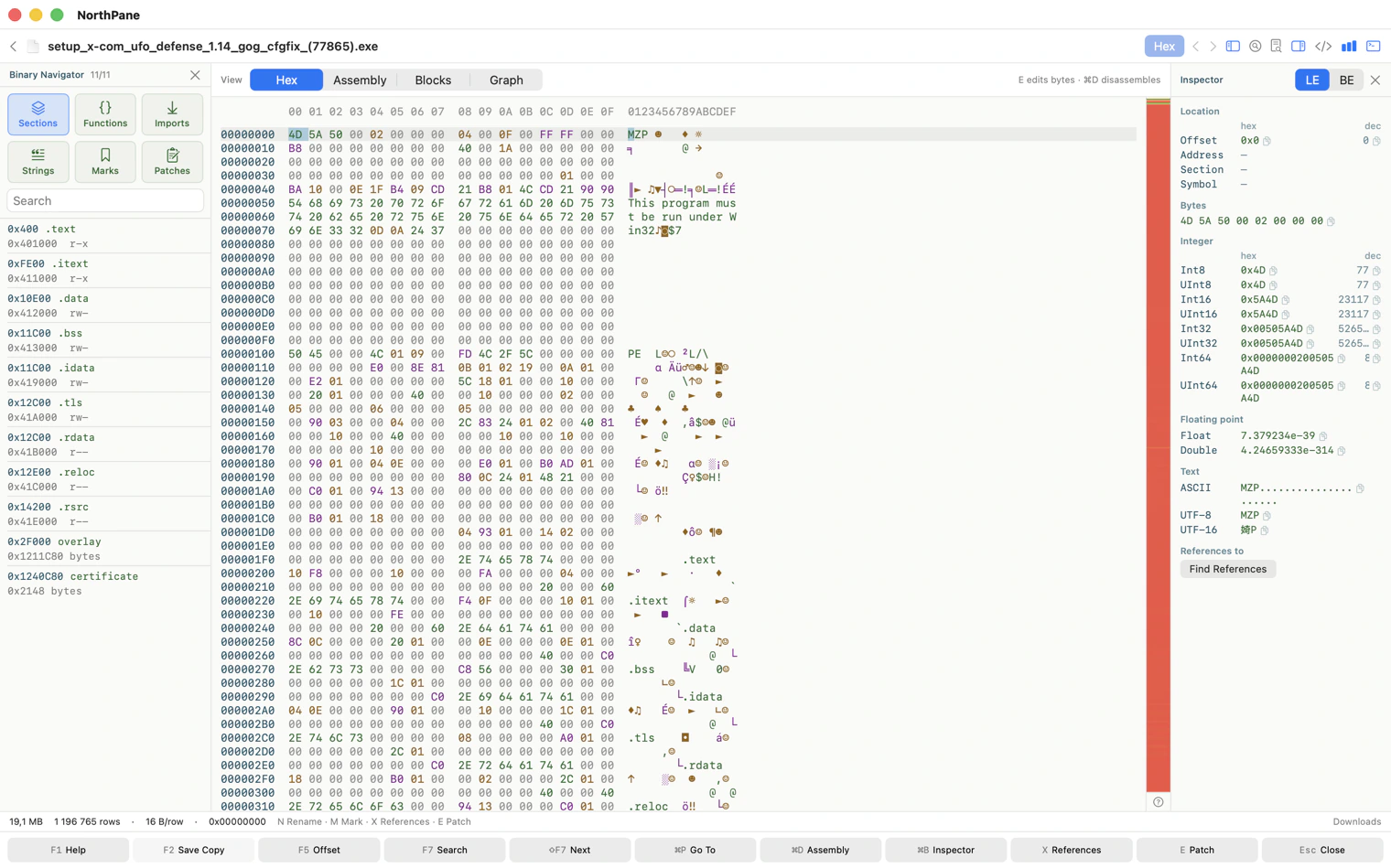
Select the .exe and press F3.
NorthPane recognizes it as a PE executable and opens Binary Lab: the navigator on the left, the hex view and entropy strip in the center, and the inspector on the right.
If one of the panels is hidden, ⌘0 and ⌘B bring them back.
2. Find the overlay
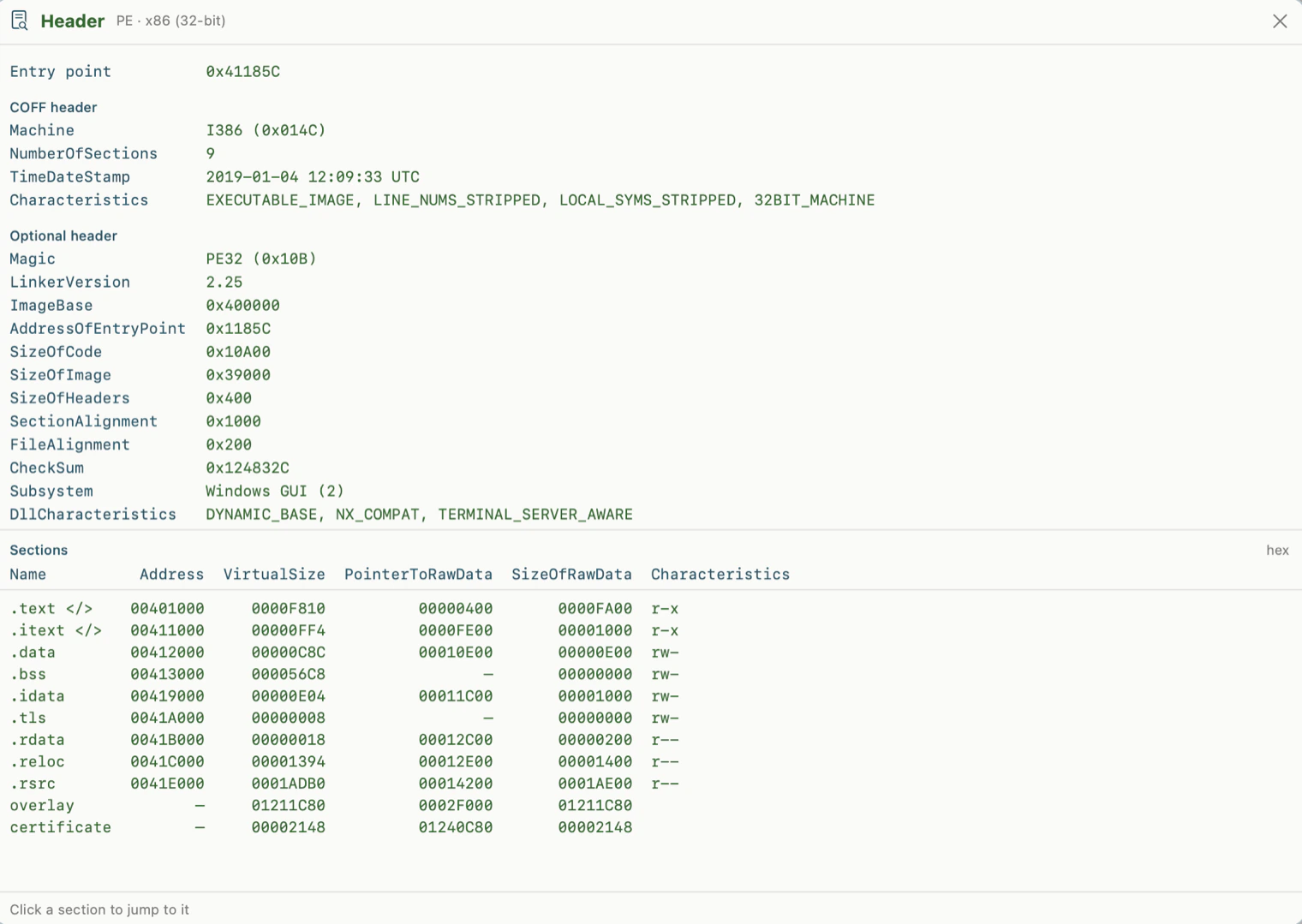
Press ⌘I.
Below the normal PE sections you will see an overlay entry.
An overlay is simply data appended to the executable that is not mapped by the PE section table. Installers often keep most of their payload there.
In this file the overlay starts at:
0x2F000
and runs almost all the way to the end of the executable. It makes up roughly 99% of the file.
0x2F000.The entropy strip tells the same story visually.
At the top there is a relatively short, irregular region containing the executable itself. Below it is one long, almost solid red block.
High entropy usually means compressed data.
Before going any further, switch to the Strings tab in the navigator and search for Inno.
In this installer we get:
Inno Setup Setup Data (5.6.2) (u)
That gives us two useful pieces of information immediately: this is an Inno Setup installer, and it was built with version 5.6.2.
3. Find the compressed data
Inno Setup data blocks use the signature:
7A 6C 62 1A
The first three bytes are ASCII zlb, followed by 1A.
The easiest way to reach it is to click overlay in the navigator. The cursor jumps to 0x2F000, and the inspector identifies the data as:
Inno Setup zlb
under the Compressed group.
You can also press F7 and search for:
7A 6C 62 1A
This particular installer contains 852 matches. The first one is the one we want.
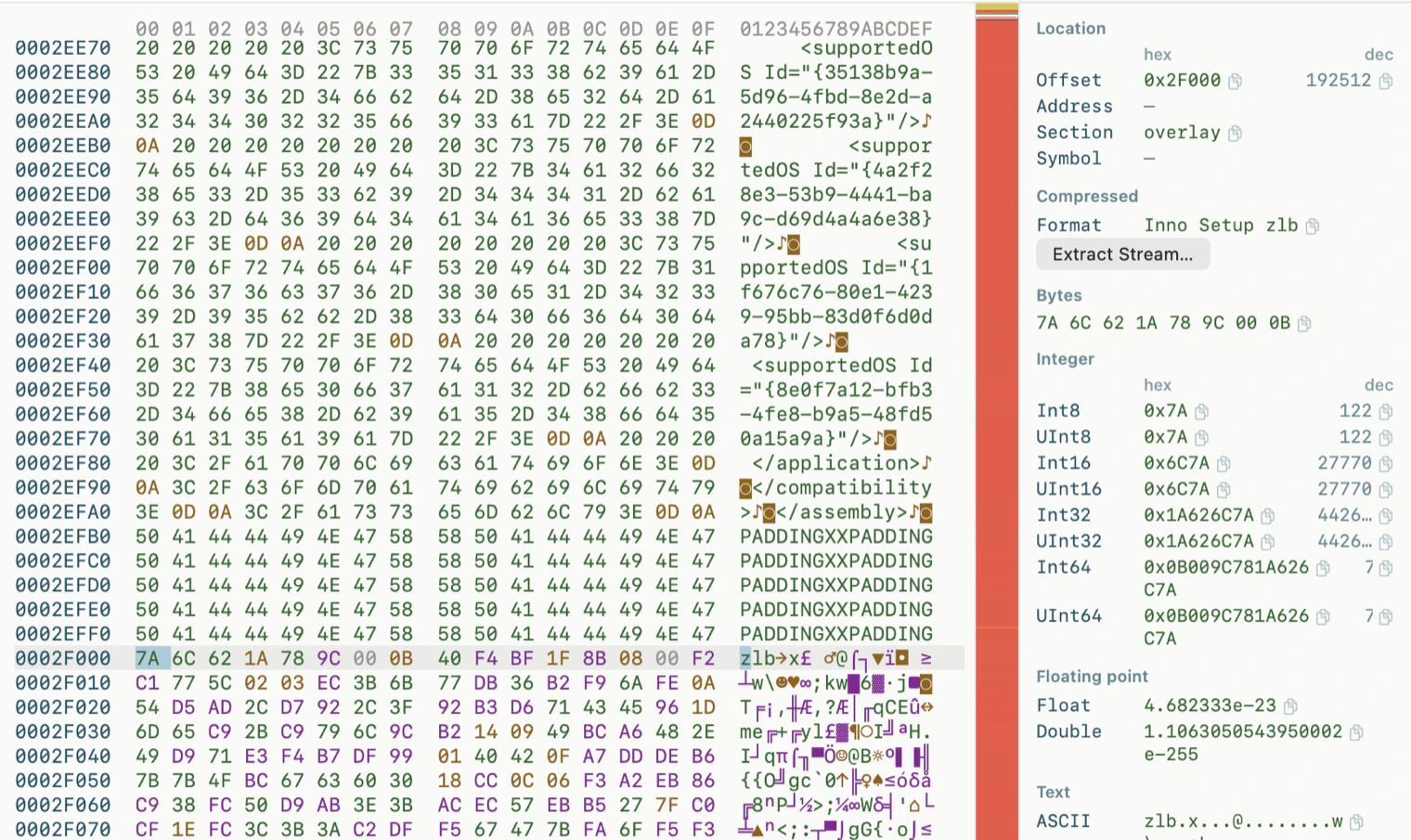
At this point we know exactly what we are looking at before touching the payload.
4. Follow the compression chain
Press ⌘E.
NorthPane starts with the stream under the cursor and follows the nested formats automatically:
Inno Setup zlb → zlib → gzip → tar
Four layers.
The final result is a tar archive, so NorthPane can show its contents and offer to extract it.
In this case it contains:
321 files, 5.9 MB
and produces:
dosbox-0.74-2.1
This is the DOSBox source tree bundled by GOG with its DOS releases.
Extraction also applies a few basic safety rules:
- entries that try to escape the destination directory through
../or absolute paths are skipped, - symbolic links are listed but not created.
The shortcut: just press Enter
Everything above is useful if you want to understand how the installer is built.
If you only want the game files, there is a much shorter path.
Go back to the .exe and press Enter.
Exactly as you would on a ZIP or TAR archive.
NorthPane parses the Inno Setup installer and opens it directly as a folder.
For this game, the panel immediately shows entries such as:
MAPS/
ROUTES/
TERRAIN/
UFOGRAPH/
SOUND/
UFO Defense.exe
and the accompanying .BAT files.
The installer has not been executed, and nothing has been extracted to disk yet.
setup_xcom.exe → NorthPane → Enter → MAPS / SOUND / UFOGRAPH → F5.From here, F5 copies selected files to the other panel.
⌥F9 extracts the whole installer into the directory shown in the other panel.
For this example that means 932 files and about 20 MB of data. Extraction takes less than a second, and every file is verified against the SHA-1 checksum stored in the installer metadata.
What Enter actually does
There is no special-case trick for GOG here.
NorthPane:
- finds the PE overlay,
- identifies Inno Setup,
- parses the installer metadata,
- walks the file table,
- reconstructs the original directory tree.
That last step matters more than it sounds.
GOG stores the real destination paths in the installer script.
In this example, 925 of 933 file records point to temporary paths such as:
{tmp}/9c/3f\<md5>
The real path only appears in a script call such as:
before_install('…', 'MAPS\XBASE_00.RMP', 1)
If you only parsed the Inno Setup file table, you would end up with a directory full of hash-named files.
NorthPane therefore parses the installer script as well and uses it to rebuild the original paths.
If a matching script entry cannot be resolved, that file stays under tmp/.
When NorthPane refuses to open it
This currently does not work when:
- the installer is password-protected,
- it uses bzip2 compression,
- the Inno Setup version is outside the supported 5.2.5–6.2 range.
Keys
| key | action |
|---|---|
F3 | opens the file in hex; recognized binaries open directly in Binary Lab |
⌘I | shows the executable header, sections, and overlay |
⌘0 / ⌘B | toggles the navigator / inspector |
F7 | searches for bytes such as 7A 6C 62 1A; ↩ next match, ⇧↩ previous |
⌘E | decompresses the stream under the cursor and follows nested formats |
Enter on .tar / .tgz | opens the archive as a folder |
Enter on .exe | opens a supported Inno Setup installer as a folder |
⌥F9 | extracts an archive or installer into the directory in the other panel |
A Windows installer, opened on a Mac, with the actual game files exposed without ever running it.